

Drop Down List Maintenance
PURPOSE
Code type documentation. Intended for developers inside the organization, and those outside who need to understand its purpose. Describes qualitative data according to code type and reflects values of the code naming conventions.
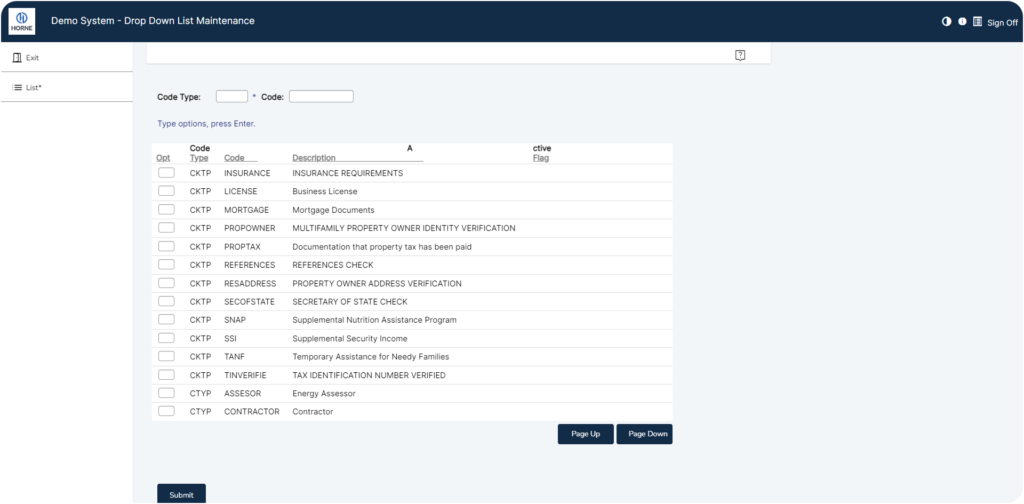
PROCESS WORKFLOW
COMPANY MANAGMENT>DROP DOWN LIST MAINTENANCE
Exit: Select Exit to return to Company Management Screen.
List: Select List or press “F4” to inquire about current code type options.
- Page Up: Selecting Page Up will reveal more code type records (if applicable).
Code Type: Type options, press Enter.
Code: Type options, press Enter.
Submit: Select Submit to continue.
(Subtext at bottom of page: “6=Add”. Type options in code type, and code boxes. Press 6 to add.)
Click on any specific code type option text box to decide to either display or change records.

Change: Select Change to see isolated Code Type record and adaptive information.
COMPANY MANAGMENT>DROP DOWN LIST MAINTENANCE>CHANGE

- Exit: Select Exit to return to Company Management Screen.
- Back: Select Back to return to Drop Down List Maintenance Screen.
- List: Select List or press “F4” to inquire about applicable code type options.
- Update: Select Update to immediately replace previous data with new information.
Display: Select Display to present isolated Code Type record for viewing.
COMPANY MANAGMENT>DROP DOWN LIST MAINTENANCE>INQUIRY

- Exit: Select Exit to return to Company Management Screen.
- Back: Select Back to return to Drop Down List Maintenance Screen.